

Introducing the Quine Recipe Analyzer
The recipe runs. Is it building the graph you meant?
A Quine recipe is a small amount of Cypher with a large amount of consequence. A few ingest queries and standing queries turn a firehose of events into a connected graph that the rest of your pipeline depends on. When the recipe is short, you can read it and know exactly what it does. When it grows to a dozen ingests, several standing queries, and node identities assembled from three different source systems, that certainty gets harder to hold.
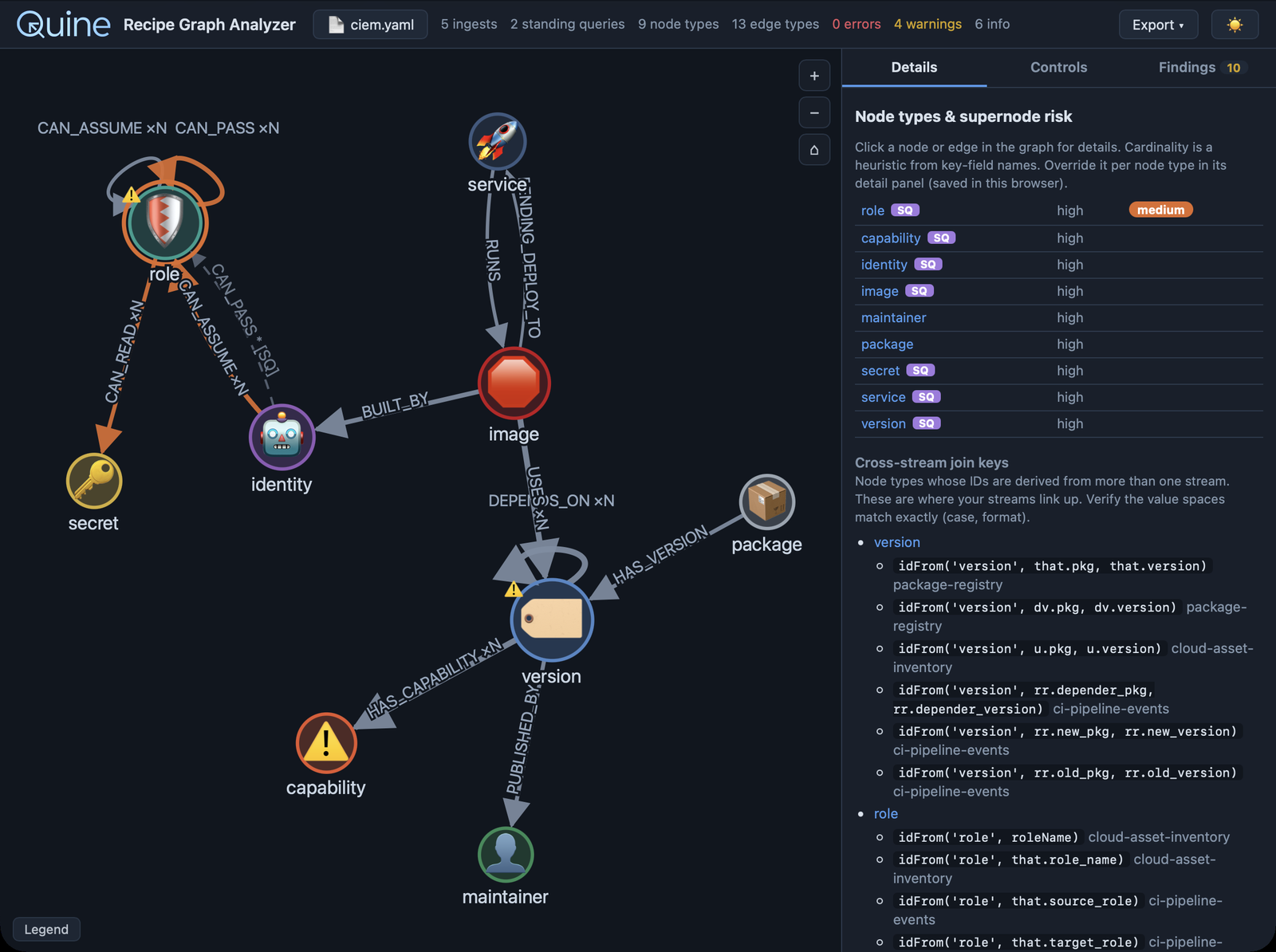
The hard part is that a recipe that is subtly wrong still runs. Data flows, nodes appear, and nothing throws an error. The graph underneath is just not quite the graph you intended, and you often cannot see the difference until something downstream returns a wrong answer.
The culprits are usually quiet:
- An
idFrom()call usestoLower()in one ingest and not in another, so the same real entity becomes two separate nodes. - A relationship is matched in a query but never created by any query, so a traversal you rely on is always empty.
- A
MATCHhas noid(n) = idFrom(...)anchor, so it scans every node in the graph on every event. - A
SET count = count + 1runs again on replay and double counts. - One node type gains an edge per event and grows without bound, and months later that supernode is why a query times out.
At enterprise volume, the distance between "it runs" and "it does exactly what I intended" gets expensive fast. By the time a duplicated identity or a missing edge surfaces, you may have reprocessed terabytes or made decisions on a graph that was wrong in a way nobody was watching for.
That is the gap the Quine Recipe Analyzer closes. It reads a recipe and, without running it, shows you the graph it will build and the problems worth fixing first. The screenshots here run it against a sample CIEM recipe: five ingest streams and two standing queries that assemble a cloud entitlement graph. You can download that recipe at the end and follow along.
See the graph before you run it
Paste a recipe, drop a file anywhere on the page, or open one with the file picker. The analyzer parses the Cypher in every ingest and standing query, infers the node types and relationships they create, and draws them.
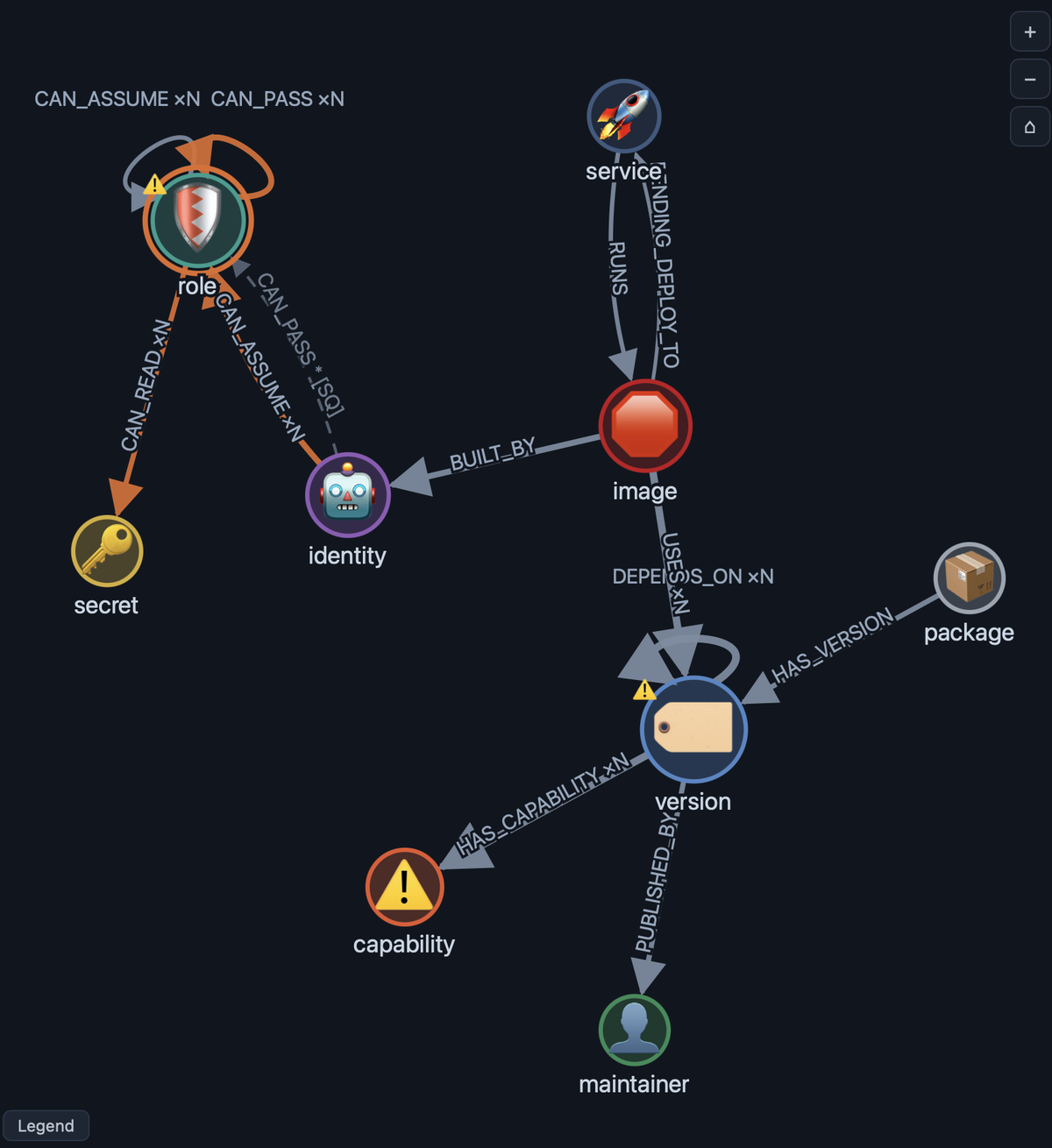
Each circle is a node type, inferred from your idFrom() prefixes and falling back to labels or to the structure of the relationships around it. Each arrow is a relationship type. A solid arrow is a relationship some query creates. A dashed arrow is one your queries only ever match, which is often the first clue that an edge you expect is never actually written. Edge thickness grows with how many query steps touch a relationship, self-relationships fan out as labeled loops so several stay readable, and a variable-length traversal is marked so you can tell a single hop from a path.
The nodes carry their own signal. Color encodes supernode risk. A dashed ring means a node is only ever matched and never written. A warning triangle marks a node with findings attached. An x marks a node that some query deletes, whether from an ingest or a standing query output. Size tracks how many relationships touch the node. You can drag nodes to untangle a layout, zoom with the wheel or the buttons, double-click to refit, hide or show a structured legend, and switch between light and dark themes. The choices you make persist across loads.
The sidebar has three tabs. Details inspects what you select, Controls changes what you see, and Findings lists what to fix.
The Details tab: inspect any node or edge
On the overview, Details lists every node type with its cardinality and supernode risk, the cross-stream join keys, and a summary of the standing queries. Click a node and it becomes an inspector.
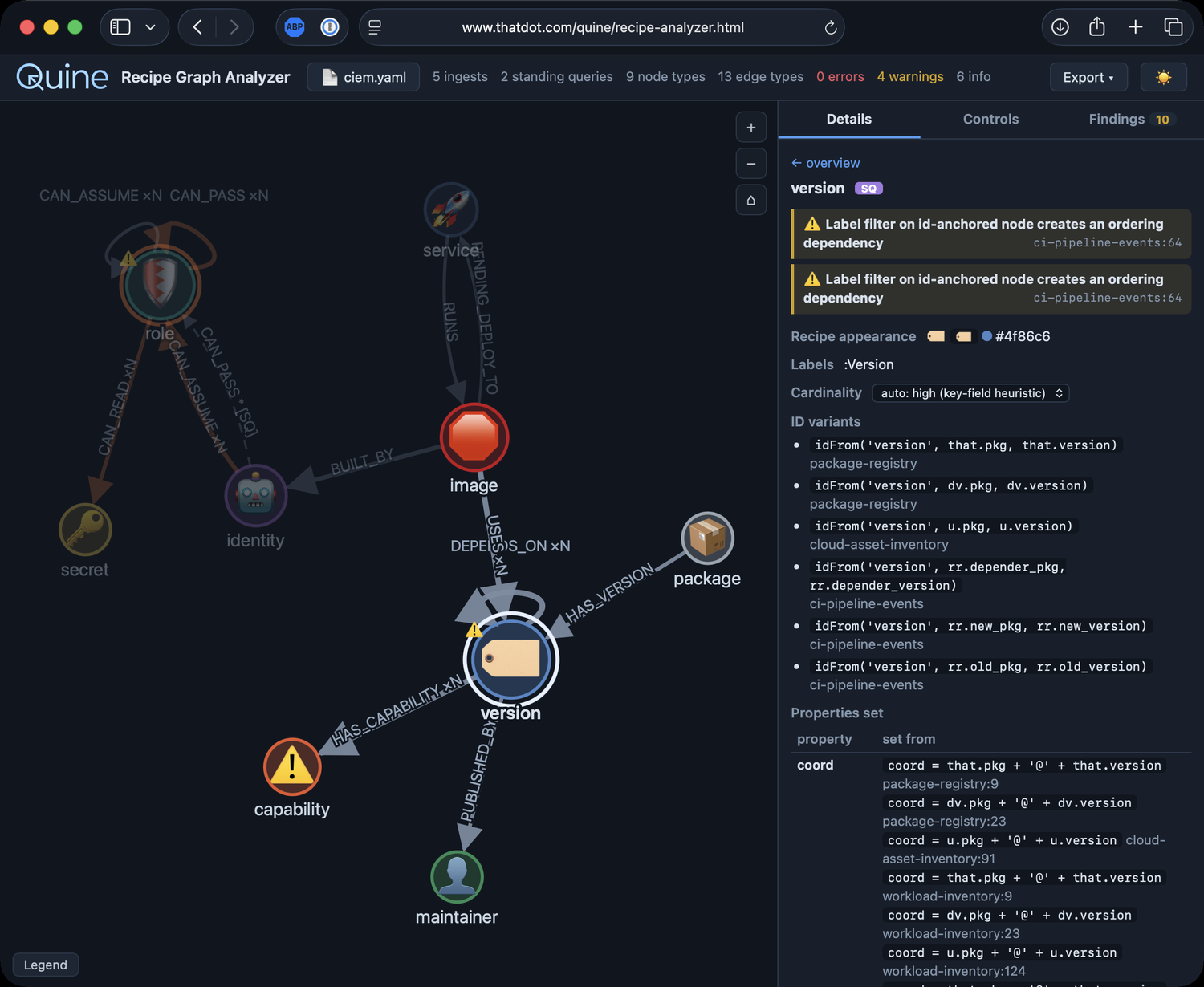
For a node it shows the recipe appearance rule it matches, a cardinality selector, and every idFrom() variant that keys it across your queries, including the pattern-column origin of values flowing in from a standing query. It lists every property the node sets, with the exact SET expression and the query and line it came from. It shows what deletes the node, why the analyzer scored its supernode risk the way it did, and the full table of edges in and out. Click an edge instead and you get its provenance: every place that relationship is touched, with the source_type filters, UNWIND fan-out, FOREACH conditionality, and DELETE cleanup around it, and for a relationship that is only ever matched, where in the recipe that type is actually created. Any warning or error tied to what you selected sits at the top, and clicking it jumps to the finding.
The Controls tab: break the recipe down
Controls is where you change what the graph shows. Toggle the standing-query layer and the recipe node appearances on or off. Switch matched-only edges and edge labels. Below those, every ingest stream and every standing query unit gets its own chip.
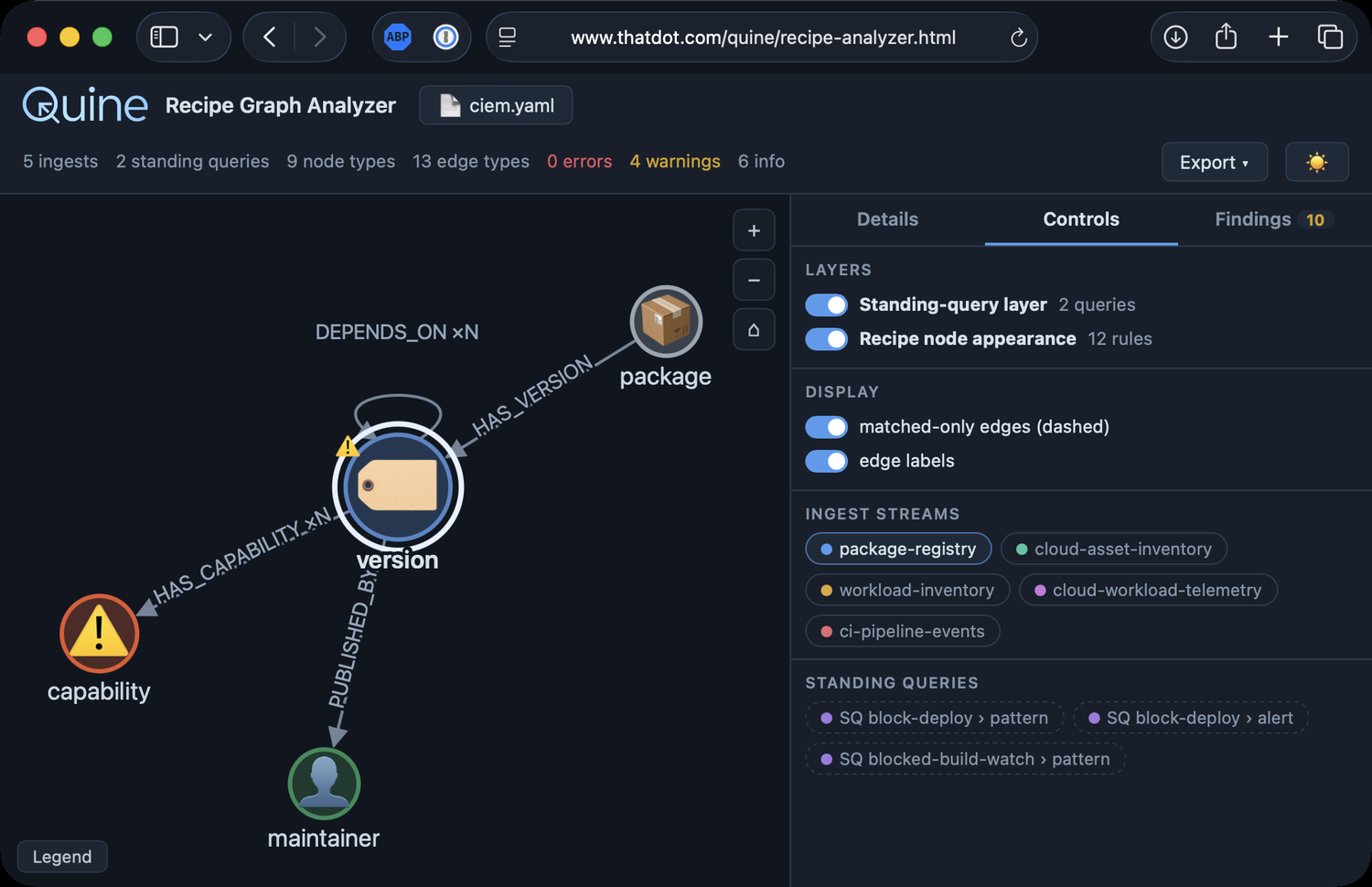
Those chips are the fastest way to understand a dense recipe. Turn a stream off and the graph redraws with just what the rest of the recipe builds, so you can see exactly what that one stream contributes: the node types it creates, the edges only it writes, and where it overlaps with the others. Work through them one at a time and a recipe you inherited stops being a wall of Cypher and becomes a set of parts you can reason about. The tab also tracks any cardinality overrides you have set, with a count and a reset.
The Findings tab: everything worth fixing, in one place
Findings is the checklist. It counts errors, warnings, and info items in the header and lists each one. Select a finding and it explains the problem and highlights the exact line of your recipe that triggered it.
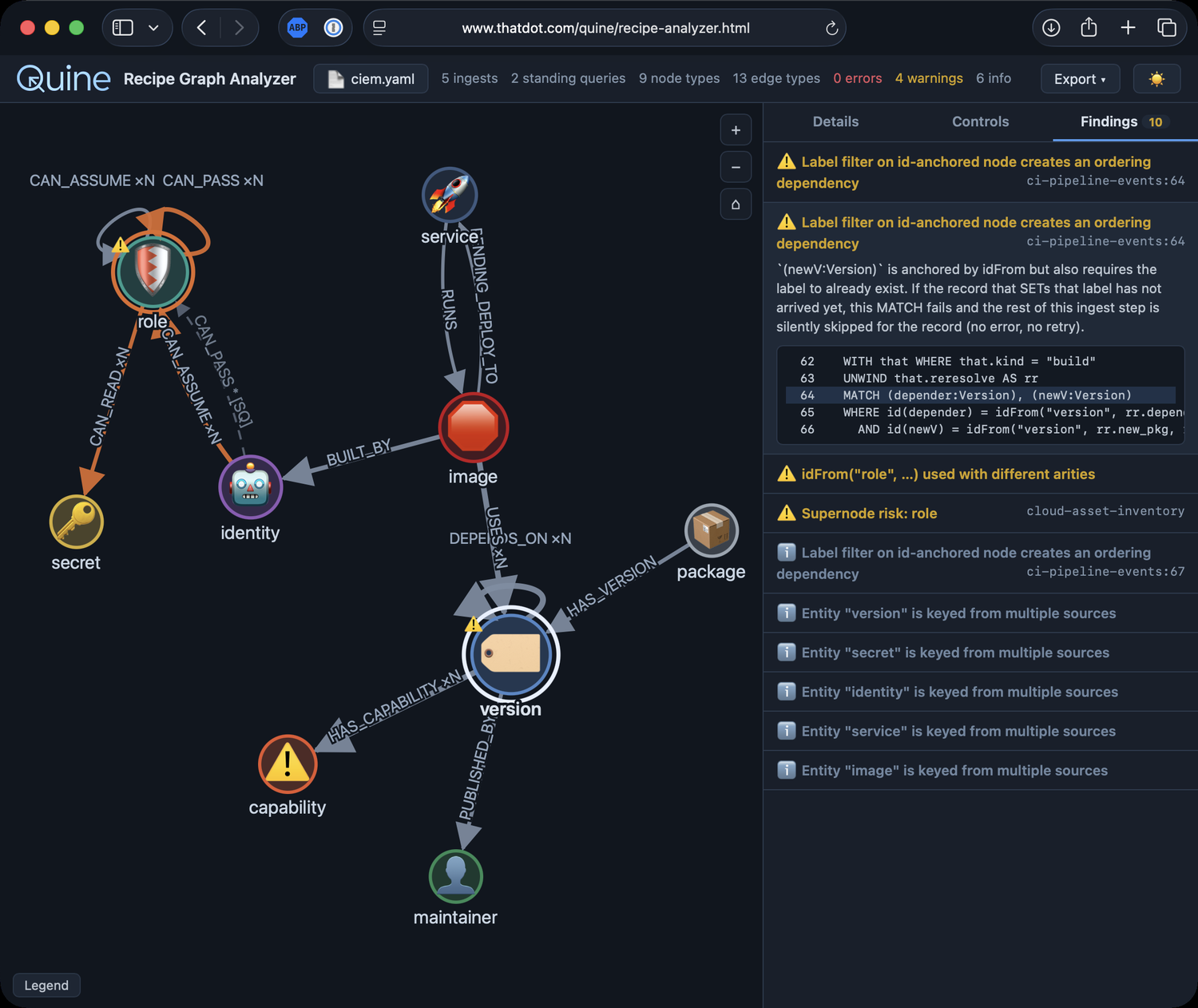
Errors are the things Quine rejects or that break outright: a MERGE that forces a full scan, properties on an edge, shortestPath in a MATCH, id() on a relationship, unsupported functions, and property access on a $that that is not JSON. Standing query patterns that violate the mode rules land here too.
Warnings are the quiet behavior changes: a MATCH with no id(n) = idFrom(...) anchor that scans the whole graph, label or property filters on an id-anchored node that can drop records under parallel ingest, labels you match but never set, relationships matched but never created, idFrom() keys whose toLower() or arity disagree across queries and silently duplicate nodes, a non-idempotent SET x = x + 1, nodes you match but never use, and supernode risk.
Info items are the smaller notes: duplicate CREATEs, a node keyed from more than one source, a soft delete versus purgeNode, unknown procedures, and pattern relationships that could not be mapped to a node type.
Standing queries get their own layer
Standing queries are where recipes get subtle, so the analyzer treats them as a separate, toggleable layer on top of the ingest analysis. It follows the result contract end to end. A pattern that does RETURN id(e) AS entity becomes data.entity, so a $that.data.entity anchor in an output query resolves back to the e in the pattern, and values flowing into an output idFrom() are annotated with where in the pattern they came from.
Because standing query patterns rarely use labels or idFrom, the analyzer infers their node types by constraint propagation, matching the pattern's relationship types against the edges your ingests and earlier standing queries create. Chained standing queries resolve in order. Patterns are validated against the DistinctId and MultipleValues rules, in both the v1 and v2 recipe formats, and each output is checked against the columns its pattern actually returns. Non-Cypher destinations like Kafka, HTTP, and Slack are listed and flagged as out of scope for analysis rather than guessed at. When you toggle the layer, supernode risk recomputes for whichever layers are visible.
Supernodes, with a cardinality you can correct
Every node type gets a cardinality estimate, from singleton up to per-event, read from its key fields and idFrom prefix. The analyzer flags the edges most likely to grow a node without bound: a large cardinality gap between the two ends, or a far side keyed per event, like a GUID or a timestamp, that accumulates edges forever.
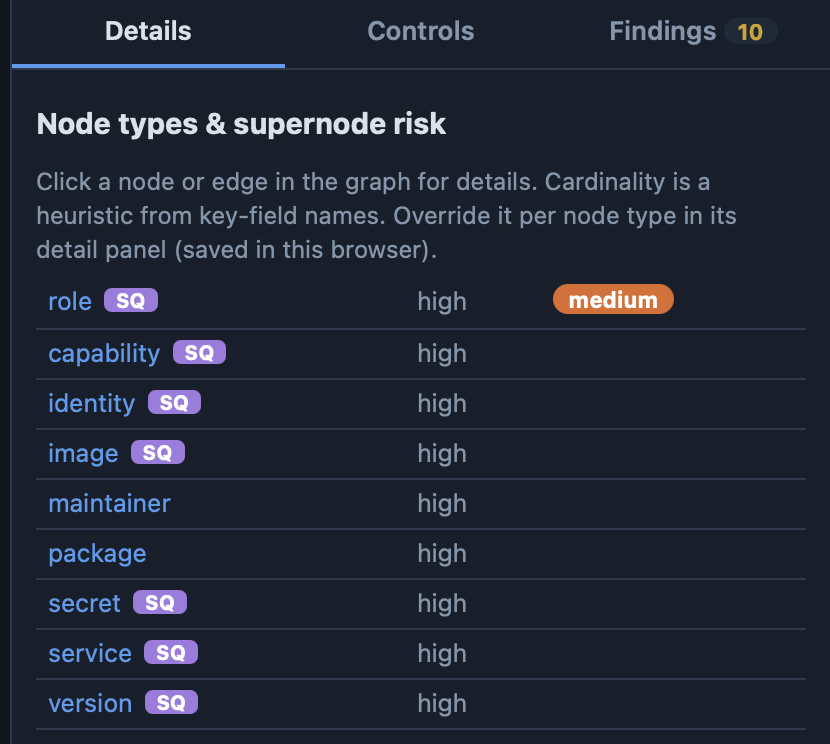
That estimate is name-based, so it is advisory. When you know the data better than a field name does, override the cardinality on any node and the scoring recomputes. Overrides are saved in your browser by node name and reapplied next time, with a running count and a reset in the Controls tab.
Cross-stream join keys
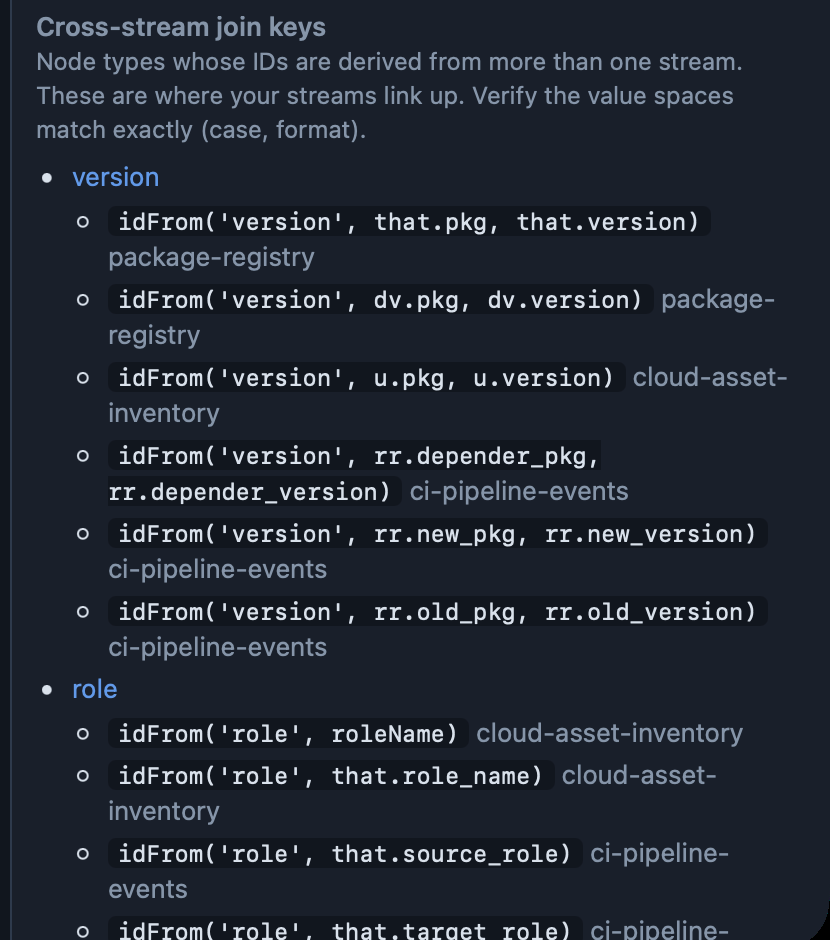
The place two streams are supposed to meet is the place they quietly fail to. The overview lists every node type whose identity is keyed from more than one stream or source, with each contributing idFrom() expression side by side, so you can confirm the value spaces match before a case mismatch or a formatting difference splits one entity into two.
It renders your node appearances
If your recipe defines nodeAppearances, the analyzer renders them the way the Quine UI does, evaluating the rules in order and matching on labels and property keys. Icons render with the real Ionicons webfont, literal emoji render as themselves, and each icon is drawn large enough to read at a glance, so the graph looks like the one you will see in Quine.
It takes the inputs you already have
You do not have to reshape anything to use it. It accepts a full Quine recipe in YAML or JSON, in both the v1 and v2 formats, including ingestStreams, standingQueries, and nodeAppearances. It also reads a Kubernetes ConfigMap whose data holds ingest maps, a plain map of name to ingest definition, a single Quine API ingest body, or raw Cypher with queries separated by --- lines. The header shows what you are analyzing and lets you reopen the original text, and when something will not parse it points at the offending line.
Export the schema it inferred
Once the analyzer knows the shape of your graph, it can hand that shape to the rest of your toolchain. Export a Markdown report to have AI Agents help with the full model, the join keys, and all the findings. Or export the inferred schema itself as GraphQL SDL, OWL or RDFS in Turtle, SHACL shapes, JSON-LD, a Mermaid ER diagram, GraphML, or plain JSON. The RDF formats use a base namespace you can set and that persists per browser. Cardinality is written as an annotation, never a hard constraint, and datatypes are inferred from names and default to string, so the export describes your graph without overstating what static analysis can know. Relationships used from several node types become union domains, so a shared edge is described once across all the types that create it.
Try it on the CIEM recipe, or bring your own
Give it a try. It is free and it runs right in your browser instantly.
The recipe in these screenshots is a synthetic CIEM example: five ingest streams and two standing queries that resolve a cloud entitlement graph and block a compromised deployment before it ships. Download it, open it in the analyzer, and click through everything above for yourself.
- Download the CIEM recipe (ciem.yaml) (right-click, “Save As...")
- Open the Quine Recipe Analyzer
Then drop in one of your own recipes and see what it tells you about the graph you are about to create.